Point of sale · works offline

PDV Open: the complete till system for your shop.

PDV Open is a point-of-sale system for small shops in South Africa: it handles sales, cash, stock and customers, installed on your shop's computer and working without the internet.

  • Works 100% offline
  • Stock, cash and customers
  • Barcode scanner
  • Slip printed on the spot
  • Several tills on the local network
  • Prices and reports in rand (R1,234.50)
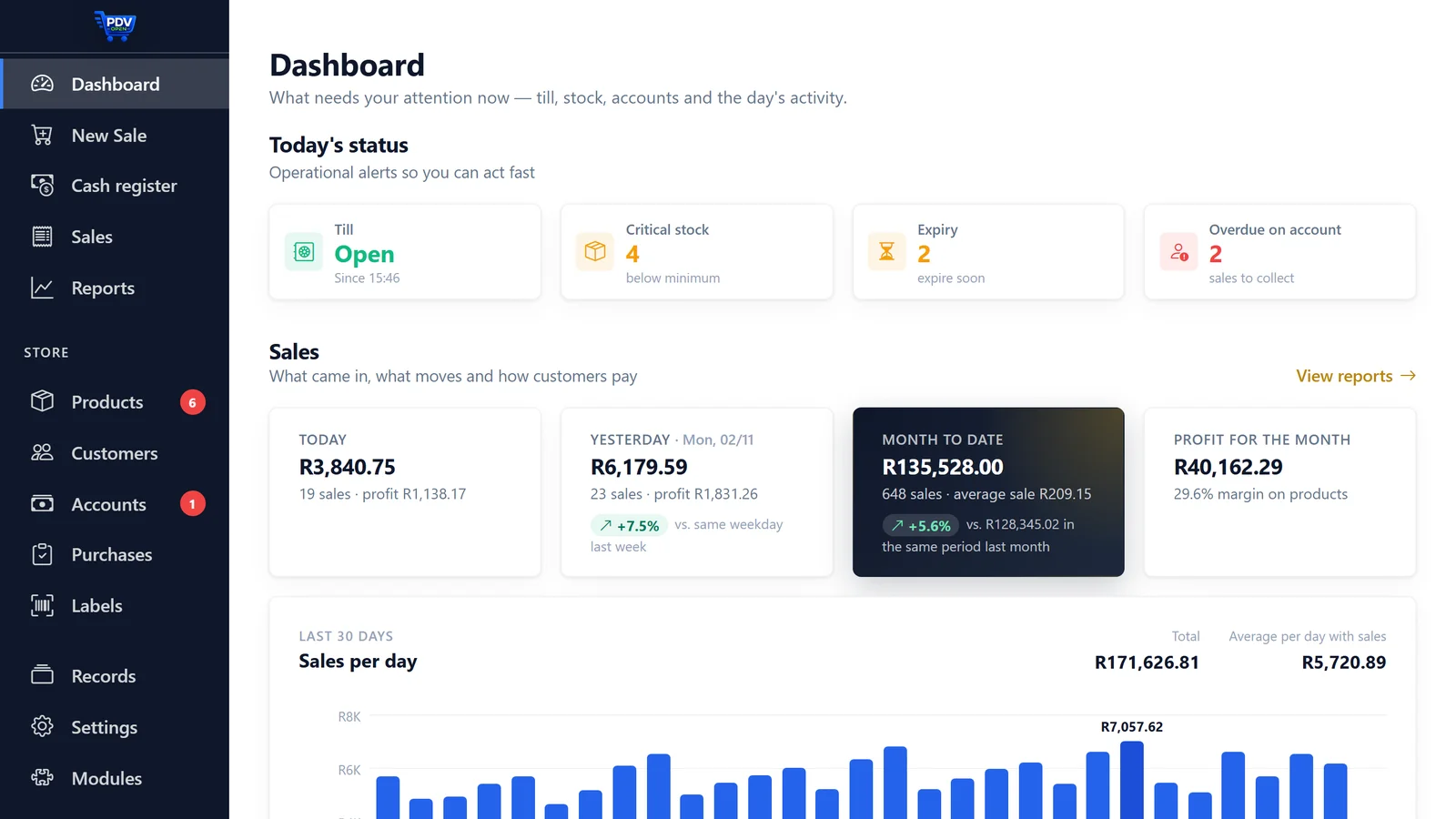
PDV Open dashboard with the till open, stock alerts and the day's result
How it works

From download to first sale, on the same day

  1. 1

    Download the installer

    Straight from this page, no sign-up. Works on Windows 10 or later and on macOS 12 or later.

  2. 2

    Add your products

    With the barcode scanner, or bring the spreadsheet from your old system: artificial intelligence builds the catalogue and you just check it.

  3. 3

    Open the till and sell

    Scan the first product, take the payment and hand over the slip. It's that simple.

Before and after

What changes at your counter

Notebook, spreadsheet and calculator

  • Prices typed in, change worked out on a calculator and the queue growing
  • Sales on account written in a notebook and customers arguing about the balance
  • Stock checked by eye and products expiring on the shelf
  • A cash-up that never balances

With PDV Open

  • Scan, total, work out the change and print the slip
  • Balance per customer, with history and receipt
  • Minimum-stock and expiry alerts on the dashboard
  • Blind cash-up: the cashier counts without seeing the expected amount
Migration with AI

Already have a system? Bring everything without typing it in again.

There is no template to fill in. PDV Open's artificial intelligence reads whatever your old system exports, in any format, and builds the catalogue for you to check.

  1. Export whatever your old system allows: products or customers, in Excel or CSV.
  2. The AI understands which column is the code, name, price, cost and stock, by looking at the values and not just the heading.
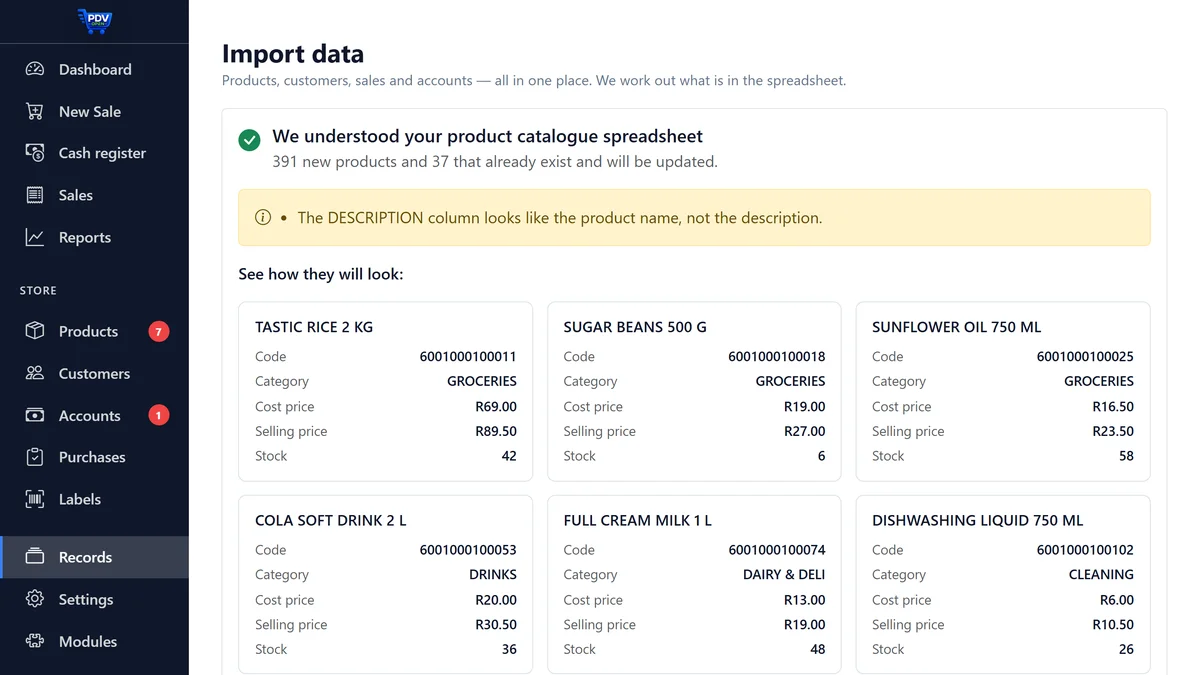
  3. Check and save. The preview shows how each product will look. Wrong column? Fix it on screen.

Only the headings and the first rows are sent for analysis. The full spreadsheet stays on your shop's computer.

PDV Open importer showing a preview of how each product will look
Features

All of this comes with the system

No basic plan and full plan: there is only one, with everything.

  • Fast counter sales with a barcode scanner
  • Sales slip printed on 58 or 80 mm paper
  • Cash control: opening float, cash drops, cash in and blind cash-up
  • Cash drawer that opens by itself on each sale
  • Stock with minimum-level and expiry alerts
  • Bulk pricing by quantity and dated promotions
  • Kits and combos that deduct each component
  • Sales on account with history and a limit per customer
  • Returns, exchanges and store credit
  • Accounts payable and payment methods with fees
  • Sales, profit and margin reports, in PDF and Excel
  • Migration from your old system with AI
  • Scale at the till and barcode labels
  • Tables, orders, kitchen printing and bill preview
  • Service orders paid at the till
  • Salespeople with commission and permissions per user
  • Several tills on the same local network
  • Backup to a folder, disk or USB stick, with restore from the program
Optional modules

Optional features, paid once

None of them is required. Add one when you buy the licence or later, from the program.

Automatic backup to Google Drive

A copy of your sales stored away from the computer, every day, without you having to remember.

  • Sends a copy of the database when you cash up and once a day.
  • Keeps only the last 7 daily, 4 weekly and 3 monthly backups.
  • The copy goes to the Google Drive of your own account: the files stay yours.
  • If the computer is stolen, burns or its disk fails, your sales stay safe.
MX$ 769 one-off payment, in Mexican pesos
Add when buying

Already have the licence? Buy just the module

Free trial · 3 days

Install it today and use PDV Open free for 3 days.

No credit card, no sign-up and no salesperson: download the installer right here and try it on your till computer, with your own products and real sales.

  1. 1Download the installer with the button below: the download starts straight away.
  2. 2Install it, open the program and click “Try free” on the start screen.
  3. 3Use it for 3 days: sell at the counter, add your products and keep track of your stock.

Windows 10 or later · macOS 12 or later

One trial per computer. When it ends, everything you recorded stays on your computer.

FAQ

Frequently asked questions

Does PDV Open have a free trial?

Yes. It's 3 days free, with no credit card and no sign-up: download the installer, open the program and click Try free on the start screen. One trial per computer.

Does it work offline?

Yes. PDV Open is installed on your shop's computer and sells without a connection. If the internet goes down, the till keeps selling — as long as the computer has power.

Can I use more than one till in the same shop?

Yes. Several tills connect to the same database over the shop's local network, with the same stock, the same sales and the same customer accounts.

Do I have to type in all my products again?

No. If you already use another system, export your products to Excel or CSV: PDV Open's artificial intelligence understands the columns and builds the catalogue so you only have to check it.

Does PDV Open issue tax invoices?

No. PDV Open is a system to control sales, cash and stock: it does not issue tax invoices or electronic invoices, and it does not connect to SARS. If your business has to issue tax invoices, use the means the law requires for that.

What do I need to install it?

A computer with Windows 10 or later, or a Mac with macOS 12 or later. A barcode scanner, slip printer, cash drawer and scale are optional.

How do I buy the licence?

The lifetime licence costs MX$ 1,099 (Mexican pesos), as a single payment with no monthly fees. The payment is processed by Hotmart, a secure payment platform: the checkout shows you the amount and the payment methods available in South Africa before you confirm. The activation key arrives in your email as soon as the payment is approved.

Why is the price in Mexican pesos?

Because sales outside Brazil go through a single Hotmart offer, in Mexican pesos, for every country. If you pay with a method in another currency, Hotmart or your bank converts it, depending on the payment method, and the final amount may vary with the exchange rate.
Ready to sell with your new till?

Buy once, install it on your shop's computer and activate it straight away. Or try it free for 3 days before you decide.